 IEP Navigator
Understand your child's IEP. Never miss a deadline.
IEP Navigator helps parents track important dates, understand their rights, make sense of dense documents, and prepare for meetings -- all in one place, in plain language.
Jump to: What it offers· See it in action· How it compares· FAQ & pricing· Get started
Get started Log inInvite-only for now — no code? Reach out and ask about access.
Built by a Minnesota high school counselor and former special education teacher — shaped with input from a family full of SPED teachers, to find what actually helps students.
Never miss a deadline
Evaluation, IEP development, annual review, reevaluation -- calculated from Minnesota's, Wisconsin's, and Vermont's own real timeline rules, including the difference between school days and calendar days, not a generic guess.
Make sense of your documents
Upload an IEP, evaluation, or Prior Written Notice and review what it actually says -- dates, goals, services, and accommodations pulled out for you, and a required-elements quote shown word-for-word, never paraphrased. Nothing saves until you review it. Your first document's scan is free; auto-fill on every document after that is part of the paid plan. Need it in another language? Translate any document into Spanish, Hmong, Somali, Vietnamese, or Mandarin.
Know your rights
A plain-language guide to your state's rules, common mistakes to avoid, and what to do if you disagree with the school -- mediation, facilitation, a state complaint, or a due process hearing -- each explained with the real law behind it.
Advocacy Center
Prepare for meetings, log every contact with the school, draft letters with AI help, and build a real evidence packet -- all in one place, organized the way a parent actually needs it heading into a dispute or a meeting.
Your Roadmap
From your child's very first referral through life after high school: what to expect at entering special education, elementary, middle, and high school, plus exploring real careers, building a resume, and practicing self-advocacy scripts -- grounded in your own child's real IEP.
Let your child see it too
A safe, simplified view your child can log into themselves, with a PIN only you control -- their accommodations explained in their own words, their career matches, and a place for their own voice to be heard.
Why this exists
IEP Navigator was built by a Minnesota high school counselor and former special education teacher, after years of watching parents leave IEP meetings overwhelmed -- unsure what to track, unclear on deadlines, even when they'd done everything right. Casey also comes from a family full of special education teachers, whose input on what actually helps students has shaped the app throughout. The goal isn't to replace the guidance a parent gets from their school team, an advocate, or a Parent Training and Information Center -- it's to help a parent stay organized and informed in between those moments: knowing when a deadline is coming, keeping documents in order, and having a real record to refer back to.
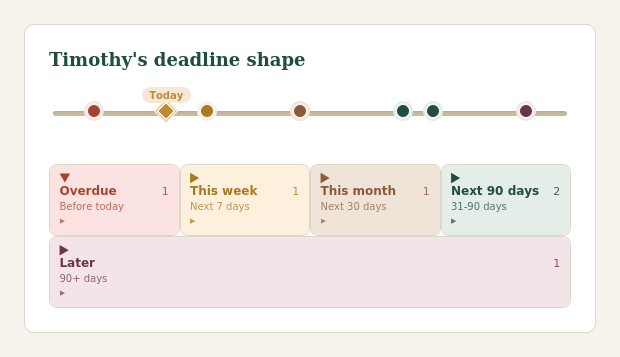
See the whole shape of what's coming up, at a glance -- not a generic to-do list -- shown with sample data.
Ask a question, get a grounded answer
Sample question and answer -- every real answer only ever quotes from verified facts already confirmed against your state's rules. If something falls outside what's been verified, it says so instead of guessing.
Built specifically for Minnesota, Wisconsin, and Vermont families -- deep, verified accuracy for these three states rather than thin coverage everywhere.
How families tracked this before
If your current system is a paper folder, a spreadsheet, or your memory, here's what you're missing.
| What you need | IEP Navigator | Paper folder | Spreadsheet | Generic app |
|---|---|---|---|---|
| Deadline math from your own state's real rules (school days vs. calendar days, MN/WI/VT specifically) | ✓ | ✗ | ✗ | rare |
| One place for documents, deadlines, and meeting notes | ✓ | ✓ | partial | ✓ |
| Plain-language rights guide, specific to your state | ✓ | ✗ | ✗ | rare |
| Required-elements quotes shown word-for-word, never paraphrased | ✓ | ✗ | ✗ | rare |
| Document translation into multiple languages | ✓ | ✗ | ✗ | rare |
| A co-parent gets full access, not a separate copy of everything | ✓ | ✗ | ✗ | rare |
| A real free tier, not a crippled trial | ✓ | n/a | n/a | varies |
| Accessible from your phone at 11pm before a meeting | ✓ | if you can find it | if synced | ✓ |
| Help if cost is a barrier | ✓ | n/a | n/a | rare |
Already using a free tool that explains your IEP? See how that compares.
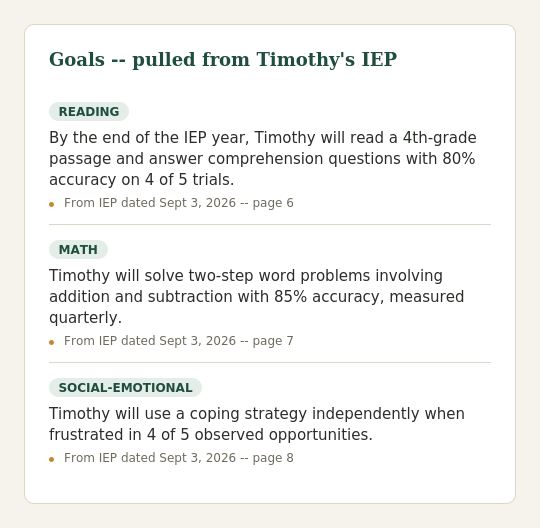
Goals pulled straight from the document, with a source you can check -- shown with sample data.
Questions other parents ask first
Can the AI make things up?
It can make mistakes, so nothing it reads from your documents is saved until you've checked it. Auto-fill is usually right, but it can misread a table or pull a date from the wrong page -- every item shows which document it came from, so you can check it against the original. Deadlines, rights, and legal requirements work differently: those come from rules we've checked against your state's actual law, with the source shown, not from the AI's own guesses. If a question falls outside what's been checked, it says so instead of guessing.
Is this legal advice?
No. IEP Navigator helps you stay organized and informed -- it isn't a law firm, and using it isn't a substitute for a licensed special education attorney or advocate for your specific situation.
Is my family's information private?
Your child's documents and data are locked to your own account -- no other family can see them. The site itself is served over an encrypted (HTTPS) connection. When a document is processed by AI, it's sent through Anthropic's API, which does not use that content to train its models.
What does it cost?
The core features most families need day to day -- document storage, deadline tracking, the state rights guide, meeting prep -- are free. AI-powered features like auto-fill, letter drafting, and career planning are part of an optional paid tier.
Not ready to sign up? Take this with you anyway.
A free, practical checklist for your next IEP meeting -- what to do before, during, and after. No signup, no email required.
Download the checklist (PDF)Ready to get started?
It takes under a minute to add your child's profile.
Get started Log inInvite-only for now — no code? Reach out and ask about access.
Everything that stores and organizes your records is free, forever -- see the plans for what the paid tier adds.